

Choosing the right automated data entry software for small business operations reduces typos and saves hours of retyping weekly. These tools capture incoming data from emails, invoices, and web forms to update your primary database automatically. Consequently, your team spends less time on manual administration and more time growing the business.
How Do Small Businesses Automate Data Entry?
Small businesses automate data entry by deploying parsing rules, OCR scanners, and workflow triggers that extract document text. The software then transfers that cleaned data into spreadsheets or cloud databases. As a result, operations eliminate manual retyping while maintaining accurate customer records across critical business applications.
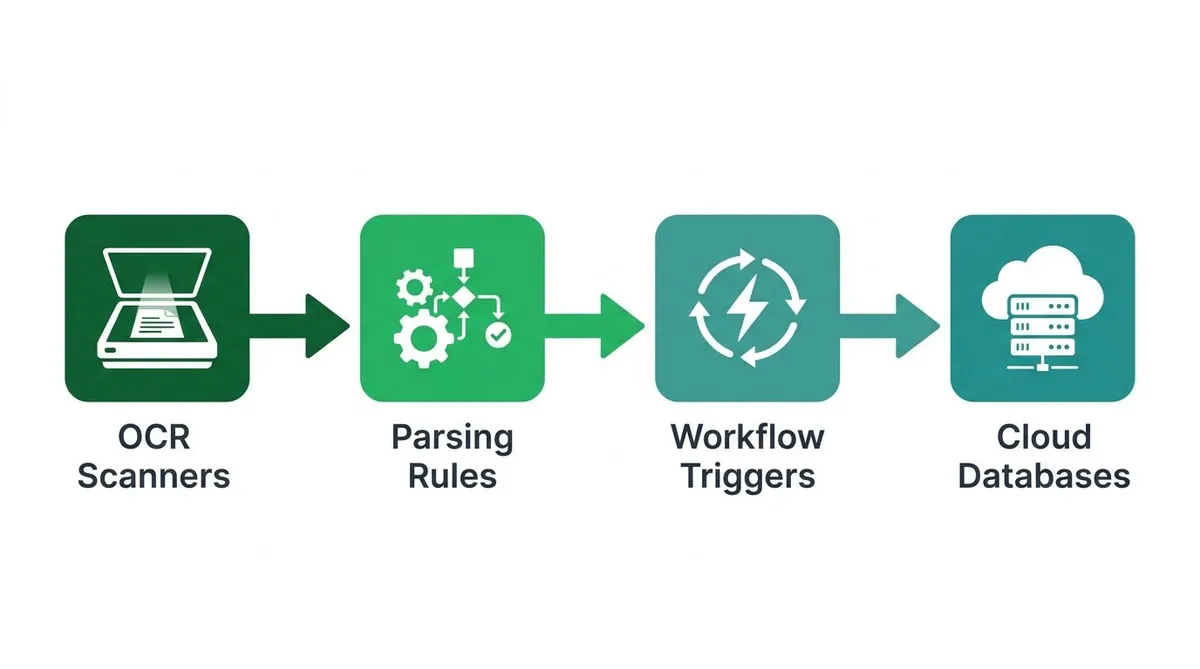
Setting up these systems depends heavily on platform complexity. Non-technical owners spend 2 to 5 hours configuring template-based extractors for basic document layouts. However, attempting custom API mapping without developer support often takes over 20 hours and creates broken pipelines.
Standard task platforms handle simple triggers well, following basic small business task automation principles. However, off-the-shelf software often struggles with non-standard document formats or complex validation rules. Learning how to eliminate manual data entry in small business operations requires matching software to exact process needs.
When standard apps fail, implementing custom workflow automation for data entry connects parsing tools directly to existing systems. Businesses with complex requirements often hire custom workflow automation developer teams to build tailored Internal Business Tools. Solutions designed with Cloud Database Integration ensure clean, reliable data flow across every department.
Automated Data Entry Software for Small Business: Extraction Tech and Accuracy
Evaluating automated data entry software for small business operations requires a realistic look at extraction accuracy. Native digital PDFs usually yield 98% to 99.5% accuracy. However, handwritten forms or skewed mobile scans often drop accuracy down to 75% or 85%.
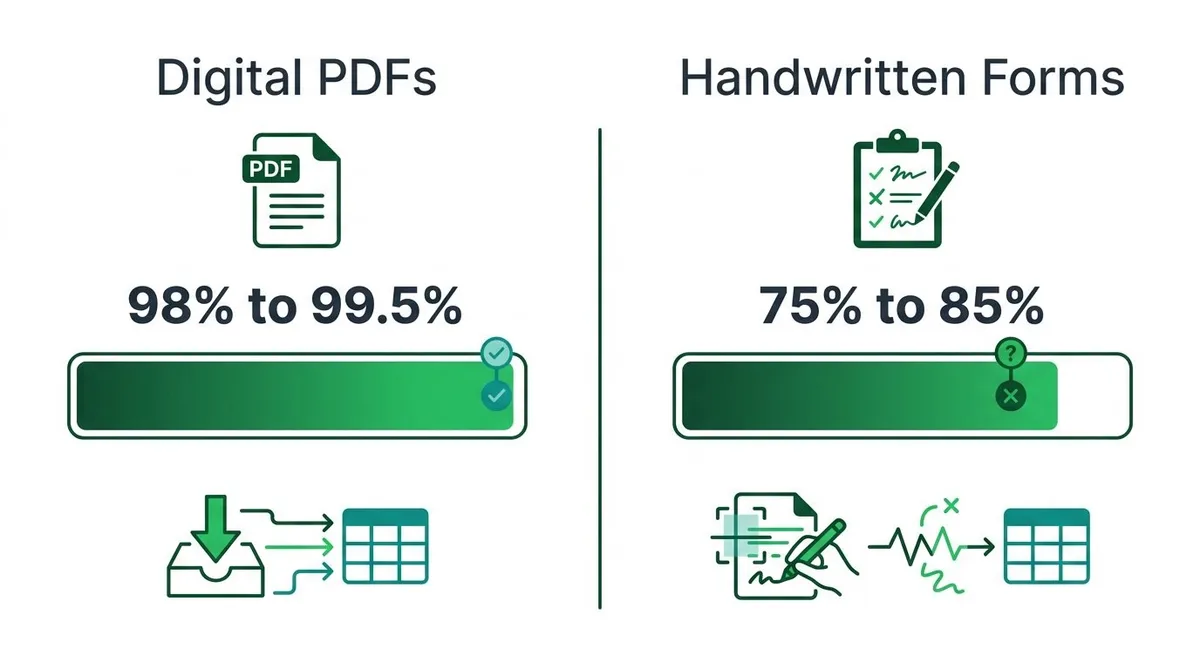
Document formats determine whether standard software or advanced AI Automation works best. Basic OCR extracts text from standard static images. Meanwhile, Intelligent Document Processing (IDP) uses machine learning to classify incoming files and categorize specific field values.
Implementing custom workflow automation for data entry ensures your team stops copy-pasting records between systems. To clarify how to eliminate manual data entry in small business pipelines, use this practical decision framework:
| If Your Document Setup Is: | And Your Operational Goal Is: | Recommended Technical Path: |
|---|---|---|
| Standardized digital PDFs with identical field layouts | Extract data quickly from recurring vendor forms | Adopt template-based Workflow Automation software. |
| High-volume data transfers across legacy desktop screens | Replicate exact keyboard and mouse inputs automatically | Deploy Robotic Process Automation (RPA) tools. |
| Unstructured multi-channel uploads like dynamic emails and receipts | Parse raw text and route structured records into core databases | Build Custom Web Apps linked via Cloud Database Integration. |
For complex operational pipelines, generic off-the-shelf tools often fail to scale reliably. As a result, you can hire custom workflow automation developer specialists to build tailored Internal Business Tools. Work with Neutron LLC to connect custom interfaces with your existing software stack.
What Is the Best AI Tool for Automated Data Entry?
The best AI tool for automated data entry depends on whether you process standard documents or work within proprietary portals. Off-the-shelf AI extractors work well for basic invoices. However, custom workflow automation for data entry offers superior accuracy and scalability when you need to connect legacy systems directly to internal tools.
Pre-built SaaS tools extract text from simple PDFs quickly. Therefore, task automation platforms help link distinct software apps to streamline multi-step operations. According to Forbes, using task automation tools helps small businesses eliminate repetitive administrative duties across separate applications.
When standard software fails on complex workflows, learning how to eliminate manual data entry in small business operations requires tailored engineering. You can hire custom workflow automation developer expertise from Neutron LLC to connect custom web apps with cloud database integration. As a result, your automated data entry software for small business operations updates internal business tools without constant manual fixes.
| Automation Approach | Cost Structure | Setup Effort | Data Accuracy | Scalability |
|---|---|---|---|---|
| Off-the-Shelf SaaS | Monthly subscription per user or document | Low (Minutes to hours) | Moderate (80% to 90% on standard PDFs) | Limited by vendor API rules |
| Native Accounting Add-ons | Low add-on fee or included | Very Low (Turnkey setup) | High for receipts, low for custom forms | Low (Restricted to single platform) |
| Developer-Built Custom Portals | Upfront build cost with low running costs | Moderate (Requires scoping and build) | Near 100% with rule validation | High (Fully scalable with your database) |
Security Compliance and Pricing Tiers Most Guides Ignore
When you implement automated data entry software for small business operations, data security becomes an immediate priority. Processing customer records or invoices requires strict security standards to protect sensitive information. As a result, you must verify how your chosen tool handles private data before connecting it to your business systems.
- AES-256 Encryption: Safeguards data both in transit and at rest within your cloud database integration.
- SOC 2 Type II: Ensures the software vendor maintains audited security practices over extended operational periods.
- HIPAA Compliance: Mandatory if your automated data extraction handles private patient or healthcare records.
Software pricing usually depends on monthly processing volume and feature complexity. Therefore, understanding these tiers helps you budget accurately while deciding how to eliminate manual data entry in small business operations.
- Entry-Level Plans ($0–$20/month): Processes under 50 simple documents per month with standard templates.
- Mid-Tier Plans ($100–$300/month): Handles 500 to 2,000 documents monthly with flexible parsing rules.
- Custom Enterprise Tier: Scales to high document volumes through direct API connectors and dedicated data pipelines.
For example, modern operational platforms like Rippling demonstrate how small business automation unifies data across internal management systems. However, if pre-built platforms fail to match your exact file structures, custom web apps offer better reliability. In those cases, you can hire custom workflow automation developer experts to build tailored pipelines for your internal business tools.
Can Excel Automatically Extract Data from PDFs or Invoices?
Microsoft Excel extracts basic text from simple single-page PDFs using Power Query or native picture tools. However, Microsoft Excel cannot reliably process multi-page invoices or unformatted receipts in bulk. Complex layout variations require specialized automated data entry software for small business operations to capture nested line items cleanly.
Excel offers built-in features like Data from Picture for basic file imports. However, these native tools fail when your business processes complex, multi-page PDFs or unformatted receipts. As a result, team members still spend hours fixing misaligned rows and retyping missing values.
Learning how to eliminate manual data entry in small business workflows requires moving beyond standard desktop spreadsheets. Dedicated tools process incoming invoices automatically, which prevents human error and speeds up your financial operations.
Consider a concrete scenario using real operational numbers. Say an operations clerk spends 15 hours every week at $25 per hour retyping invoice details into spreadsheets. That repetitive task costs your business $19,500 every year in direct wages.
When you hire custom workflow automation developer experts at Neutron LLC, you build tailored systems for your business. By utilizing Custom Portal Development and Cloud Database Integration, custom workflow automation for data entry replaces manual invoice logging entirely.
If this system reduces manual work by 90 percent, your yearly labor expense drops to $1,950. Assuming a custom deployment cost of $8,000, your business achieves a net 12-month savings of $9,550 in year one. Therefore, you gain $17,550 in recurring annual savings every year after.
How to Eliminate Manual Data Entry in Small Business Operations
To update your operations, you must replace loose spreadsheets with a structured pipeline. You can discover how to eliminate manual data entry in small business workflows by executing four steps.
- Audit manual data touchpoints: Track every email, paper invoice, and spreadsheet your team touches daily.
- Standardize incoming formats: Require suppliers and clients to use uniform web forms or standardized PDF templates.
- Implement OCR validation rules: Set automated rules to check totals, tax rates, and line items instantly.
- Establish exception handling: Direct low-confidence data extractions to a human reviewer before saving them to your system.
Off-the-shelf automated data entry software for small business works best for standard tasks. For example, simple receipt scanning usually requires only basic pre-built tools.
However, subscription costs stack up quickly when you connect multiple third-party tools. As a result, off-the-shelf software may cost more over time than tailored systems.
You should hire custom workflow automation developer specialists when your business needs unique software integrations. Building Custom Web Apps and Internal Business Tools creates a centralized platform for your data.
Through custom workflow automation for data entry, you combine AI Automation with direct Cloud Database Integration. Engineering teams like Neutron LLC build these custom solutions so you can eliminate redundant recurring software costs.