

Applying b2b distributor website design best practices helps you replace slow, manual ordering with fast digital workflows. When procurement teams order industrial parts, your site must deliver instant SKU lookup and custom account pricing. Modernizing your web presence cuts down phone calls, reduces order errors, and frees your team for high-value sales growth.
B2B Distributor Website Design Best Practices for Modern Procurement
B2B purchasing rarely involves just one person. Instead, buying committees include procurement officers, engineers, and field managers who each need distinct account permissions. To learn how to modernize an industrial distributor website, start with role-based catalog controls and rapid SKU search.
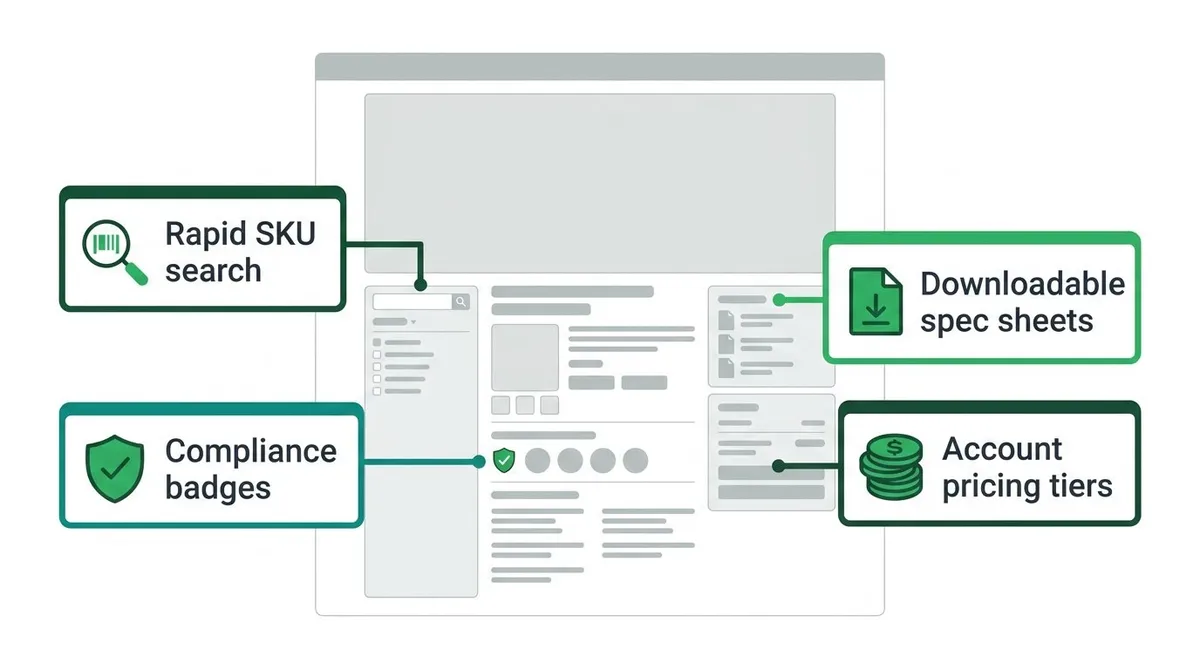
According to research from Salesforce, B2B purchasing involves complex workflows that require tailored buying journeys for different account roles. Therefore, your catalog search must handle part numbers, spec sheets, and contract pricing instantly without forcing buyers to call sales.
Establishing authority across commercial channels requires immediate visual proof of operational quality. Buyers need fast access to ISO certifications, safety data sheets, and technical specifications before submitting large purchase orders.
- Compliance badges: Display ISO, OSHA, or industry certifications clearly near product purchasing controls.
- Downloadable spec sheets: Provide one-click PDF access for engineering and safety review teams.
- Account pricing tiers: Connect contract pricing using Cloud Database Integration so logged-in buyers see accurate rates.
Implementing a b2b distributor ecommerce platform custom integration ensures your catalog syncs directly with inventory systems. As a result, your team spends less time handling manual order entries and more time growing core accounts.
How does ERP integration affect B2B distributor website UX?
ERP integration affects B2B distributor website UX by controlling how fast stock levels, order history, and contract pricing load. Slow enterprise resource planning database queries delay page response times. Therefore, proper data pipeline architecture determines whether buyers complete online purchases or abandon their carts.
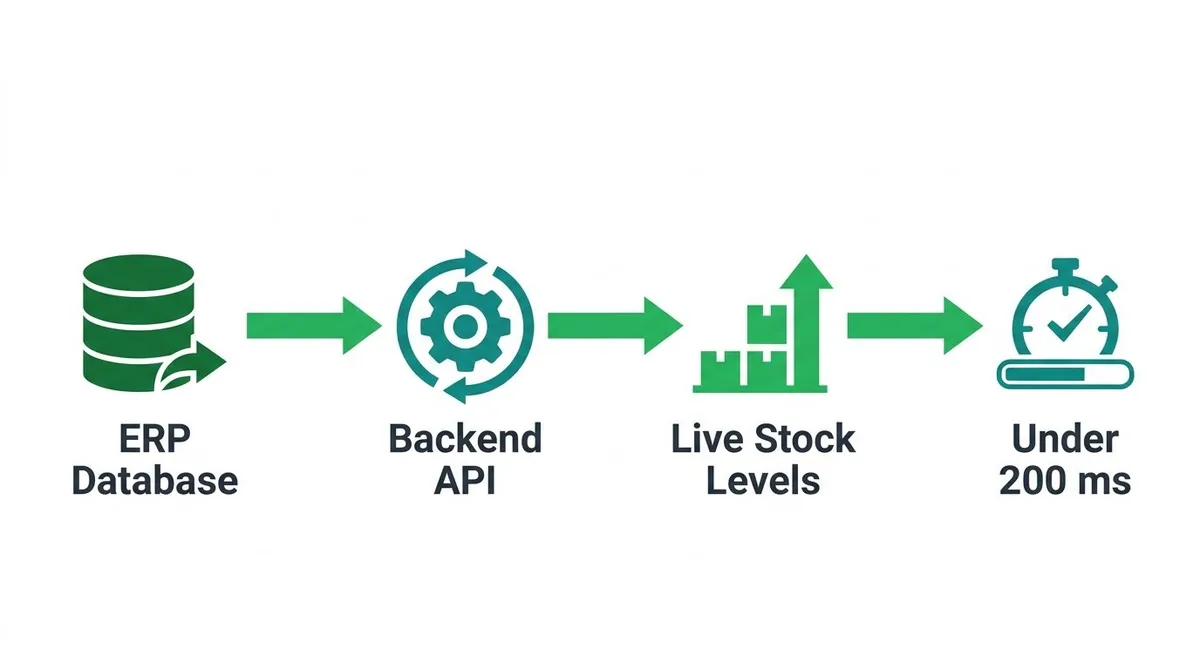
When managing over 100,000 SKUs, your catalog search must process live stock levels instantly. You should target a backend API latency under 200 milliseconds for inventory queries. If queries take longer, buyers experience lag, which leads to dropped sessions.
Account-specific contract pricing complicates standard web caching. Because every logged-in buyer sees unique rates, traditional static caching fails. Using edge-side rendering (ESR) allows your system to assemble personalized pricing rules near the user. Consequently, this keeps your initial Time to First Byte (TTFB) under 400 milliseconds.
A targeted b2b distributor ecommerce platform custom integration isolates pricing calculations from core page layouts. As a result, catalog browsing stays fast even when complex discount tiers apply.
Consider a scenario where an industrial distributor manages 50,000 ERP SKUs with continuous inventory updates. Direct backend queries for every catalog search can push page render delays past 3.5 seconds.
By deploying a Neutron LLC Cloud Database Integration, you offload heavy query traffic to a fast synchronization layer. Here is how the performance breakdown works step by step:
- Raw ERP Query: 800ms base response time across 50,000 SKUs.
- Cloud Middleware Processing: 150ms sync speed to regional edge nodes.
- Edge Cache Execution: 250ms render time for dynamic pricing.
- Total Page Load Time: 1.2 seconds total, cutting load time by 2.3 seconds.
As a result, your buyers see accurate inventory counts without experiencing website slowdowns.
What features should a distributor ecommerce website include?
A distributor ecommerce website should include customer-specific pricing engines, contract-based catalogs, multi-tier buyer approval workflows, and rapid bulk order tools. These essential features eliminate manual order entry overhead. As a result, procurement teams place high-volume orders directly without calling sales representatives.
According to an analysis of B2B eCommerce capabilities by VirtoCommerce, enterprise portals must support complex matrix pricing and customer-specific catalogs. Standard storefronts fail when account buyers log in and see generic list prices. Therefore, your portal design must dynamically display negotiated contract rates alongside tailored inventory availability as soon as a buyer logs in.
Your ordering interface needs clear UX wireframes for multi-tier customer approval hierarchies. For example, buyers often set spending threshold triggers, such as requiring manager sign-off on carts exceeding $5,000. Implementing role-based checkout permissions and real-time order audit logs prevents unauthorized purchases while avoiding operational bottlenecks.
When considering b2b distributor website design best practices, rapid bulk order entry features are vital. Incorporate direct SKU entry grids, CSV upload widgets, and single-click reorder buttons directly into customer dashboards. As a result, your buyers eliminate manual data entry, which means your fulfillment team spends far less time processing repetitive paperwork.
Modernizing Industrial Distributor Websites: Architecture and Integration
Legacy systems often slow down daily operations. Knowing how to modernize an industrial distributor website requires connecting your backend catalog to a clean frontend interface.
A successful upgrade relies on smart technical planning. Here are the core steps to modernize your infrastructure using a b2b distributor ecommerce platform custom integration:
- Audit your data: Clean up catalog SKUs, customer tiers, and pricing rules inside your ERP.
- Build an API middleware layer: Connect legacy databases to your site without exposing internal business tools directly.
- Implement caching layers: Store frequently accessed catalog queries in memory to speed up page loads.
- Deploy a decoupled frontend: Separate your buyer interface from heavy backend processing to protect site speed.
Your technical stack depends on catalog size and system age. Use this operational checklist to choose your architectural path:
- If catalog has under 10,000 SKUs and modern ERP APIs: Use standard ecommerce platforms paired with direct Cloud Database Integration.
- If catalog exceeds 50,000 SKUs with custom pricing: Build middleware using Custom Web Apps to process logic before rendering pages.
- If legacy ERP lacks REST APIs: Deploy an intermediate data lake, so database calls do not crash your server.
- If inventory updates occur continuously: Add dedicated caching layers, which means product pages load instantly for returning buyers.
Pre-built ecommerce plugins often add heavy code bloat. As a result, slow load times can hurt your search engine rankings and frustrate buyers.
Choosing Custom Portal Development solves these speed bottlenecks. Custom software strips out unused plugin scripts, so your site loads quickly and easily passes a Technical SEO Audit.
Furthermore, custom portals give your team complete control over complex workflows. You can automate custom quote generation, which saves hours of manual data entry every week.
How do I optimize a B2B distributor website for lead generation and conversion?
Optimizing a B2B distributor website for lead generation and conversion requires technical documentation, automated RFQ workflows, and parametric indexation controls. You must offer downloadable CAD files next to clear quote request buttons. As a result, automated pipelines push buyer data straight into your Internal Business Tools without manual entry.
Effective b2b distributor website design best practices prioritize conversion elements on every product detail page. For example, procurement managers need immediate access to downloadable spec sheets and technical drawings. Place prominent Request for Quote (RFQ) buttons next to these assets so buyers submit inquiries immediately.
When buyers submit quote requests, delayed responses cost you orders. Implementing Workflow Automation and AI Automation allows your website to process incoming leads instantly. Therefore, your software parses quote details and syncs buyer records automatically, which saves your sales team hours of manual spreadsheet entry each day.
Large catalogs use deep filtering that often creates millions of duplicate catalog URLs. Deploying technical Search Engine Optimization (SEO) rules prevents search engines from indexing repetitive faceted search queries. When learning how to modernize an industrial distributor website, apply strict canonical tags. However, keep high-value parametric search pages discoverable to capture targeted buyer searches.