

Learning how to automate invoice processing with AI requires using AI to extract document data, match purchase orders, and streamline back-office workflows. Follow this full guide to learn how automating invoice processing with AI enables you to extract document data, match purchase orders, and streamline back-office workflows.
To learn how to automate invoice processing with ai, you must capture incoming documents, extract data using machine learning, and validate line items against your purchase orders. This approach eliminates manual data entry and sends structured payments straight to your accounting software. As a result, your team saves valuable back-office hours while cutting human processing errors.How to Automate Invoice Processing with AI: Architecture and Workflow Steps
Modern ai document data extraction for business combines Optical Character Recognition (OCR), natural language processing, and machine learning. OCR scans physical or digital files to read raw text. Then, language models identify key fields like vendor names, invoice numbers, and line items. Finally, machine learning logic performs two-way or three-way matching against existing purchase orders.
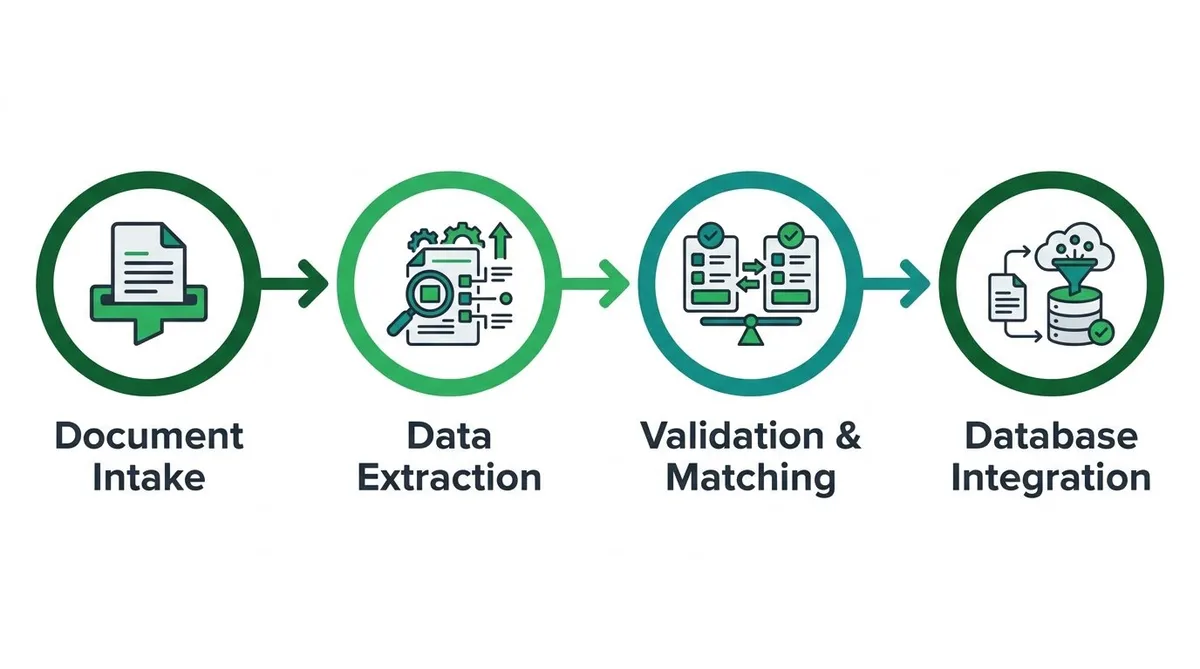
A typical pipeline moves files step-by-step from raw intake to final accounting sync:
- Document Intake: Invoices arrive via email attachments, file uploads, or scanned paper documents.
- Data Extraction: AI models parse PDF or image files to extract structured key-value pairs.
- Validation & Matching: Custom logic checks extracted data against purchase orders to verify line items and pricing.
- Database Integration: Approved payment data moves through cloud database integration for small business directly into your ERP or internal tools.
For standard layouts, prebuilt solutions like the Microsoft AI Builder invoice model extract key fields out of the box without custom training. However, if your suppliers submit non-standard tables or specialized formats, standard tools often fail. In those operational scenarios, custom model architecture designed for practical ai automation for business ensures high accuracy and reliable data transfer.
What is the Difference Between Traditional OCR and AI Document Processing?
Traditional Optical Character Recognition (OCR) relies on rigid templates to read fixed document coordinates, whereas AI processing uses machine learning to understand context. This allows adaptive ai document data extraction for business to parse unstructured invoices without requiring new layout templates for every vendor.
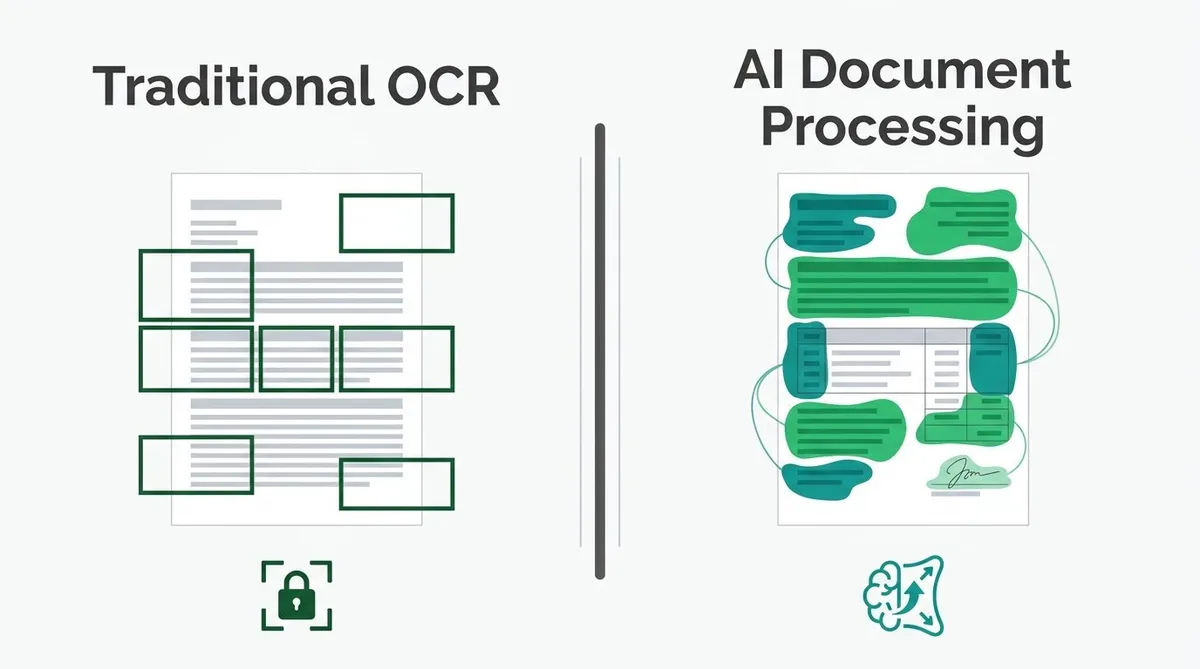
Legacy OCR breaks down whenever a vendor shifts a table column or font. However, machine learning algorithms read invoice data conceptually by recognizing line items, descriptions, and totals anywhere on the page. Therefore, you spend zero time building custom rules for new supplier layouts.
Modern document processing also manages complex international invoicing requirements automatically:
- Currency conversion: Extracting foreign transaction values and applying accurate, real-time exchange rates.
- Tax compliance: Validating localized VAT, GST, and regional sales tax structures across jurisdictions.
- Multi-language support: Reading vendor line items in foreign languages and mapping them to your ledger.
As a result, your team prevents costly manual entry errors and speeds up approval workflows. Connecting this technology with a cloud database integration for small business ensures clean financial records move straight into your main accounting tools.
Setting Confidence Thresholds: When Does AI Route Invoices to Human Review?
AI routes invoices to human review when field-level extraction confidence scores fall below your set operational thresholds. High-confidence documents process automatically into your accounting software. However, moderate-confidence invoices require a quick targeted check, while low-confidence files move to staff for full manual review.
Setting clear confidence boundaries prevents bad data from corrupting your financial records while keeping work moving quickly. You can establish field-level routing using a structured decision framework.
| Confidence Score | System Action | Operational Workflow |
|---|---|---|
| 90% to 100% | Straight-Through Processing | Data automatically posts to your database without staff review. |
| 75% to 89% | Human-in-the-Loop Review | System flags specific low-confidence fields for a visual spot check. |
| Below 75% | Full Manual Verification | Document routes to an exception queue due to unreadable text or missing fields. |
When team members correct flagged fields during validation, the platform captures those edits as retraining data. As a result, the ai document data extraction for business engine learns unique vendor layouts over time.
Therefore, early manual interventions directly improve future parsing accuracy. This continuous feedback loop cuts review times, which helps automate repetitive back office tasks across your operations.
Secure Integration: API Standards and Protecting Vendor Banking Data
Connecting AI extraction pipelines to your accounting software requires strict security protocols. You must enforce TLS 1.3 encryption for all invoice data moving between processing services and internal systems. Additionally, using OAuth 2.0 authentication ensures token-based access, so system passwords remain completely hidden from third-party tools.
Vendor banking details are prime targets for fraud when learning how to automate repetitive back office tasks. To protect sensitive routing numbers, all stored extraction outputs require AES-256 encryption at rest. Implementing secure cloud database integration for small business workflows creates explicit access logs, because every file modification must be traceable.
When flagged invoices require human review, workers should not have direct database access. Through custom portal development, businesses build safe review interfaces that interact strictly through scoped API calls. Therefore, team members can confirm bank details safely without exposing underlying database credentials to potential leaks.
How Much Money Does AI Invoice Processing Save Per Invoice?
AI invoice processing typically saves businesses between $10 and $15 per invoice by reducing manual data entry labor. While processing a single paper or PDF invoice manually costs around $12 to $15 in overhead, practical AI automation for business lowers that cost to roughly $2 to $3 per document, including software and cloud database integration costs.
Manual processing costs build up quickly through labor hours, typing errors, and delayed approval cycles. However, calculating true operational savings requires looking beyond raw labor reduction.
To determine actual financial impact, you must balance manual labor savings against all implementation and operating expenses:
- Upfront Development: Initial pipeline configuration and custom AI document data extraction for business rules.
- Model Training: Fine-tuning optical character recognition and mapping for complex vendor invoice layouts.
- Licensing and Infrastructure: Monthly software fees, API token usage, and cloud database integration costs.
- Maintenance and Exceptions: Routine pipeline updates and staff time spent reviewing flagged low-confidence invoices.
Consider a practical operational example to see how the numbers work through over a full year.
Say a regional distributor processes 2,500 invoices per month. At a standard manual cost of $12 per invoice, their existing labor and back-office overhead equals $30,000 per month, or $360,000 annually.
Now assume this distributor implements custom AI Automation built by Neutron LLC:
- Upfront setup fee: $15,000 one-time engineering investment.
- Licensing and cloud API processing: $1,000 per month ($12,000 annually).
- Human exception review labor: $5,000 per month ($60,000 annually, averaging $2.00 per processed invoice).
In year one, total spending on automated processing reaches $87,000. Subtracting $87,000 from the $360,000 manual baseline delivers $273,000 in net first-year savings. As a result, the business cuts its cost per invoice from $12.00 down to $2.90 while showing staff how to automate repetitive back office tasks.
Scaling AI Automation Beyond Invoices to Other Back-Office Tasks
Once you set up document processing for vendor invoices, you can expand that same pipeline to other unstructured files. For example, learning how to automate purchase order entry uses the exact same parsing engine that reads invoice line items. The system captures part numbers, quantities, and delivery dates from incoming customer PDFs without manual typing.
This approach transforms ai sales order processing for distributors who handle hundreds of emailed orders daily. Instead of rekeying order forms, ai document data extraction for business sends verified order data straight to your database. As a result, your team fulfills customer orders faster while avoiding costly fulfillment errors.
Document extraction is only the first step in learning how to automate repetitive back office tasks. By implementing custom ai agent development for business, you create software routines that actively validate data across departments. These AI agents check incoming sales orders against inventory stock levels and alert accounting if pricing mismatches occur.
Connecting these automated workflows through cloud database integration for small business removes operational silos between sales, inventory, and finance. Therefore, routine data transfers happen instantly in the background. Your staff stops doing robot work and shifts their focus back to customer support and core operational growth.
Automation works best when leadership can monitor performance across every active workflow. Building custom Internal Business Tools gives your team live visibility into document processing queues and pipeline bottlenecks. If invoice approvals stall or sales orders back up, your custom dashboard flags the exact bottleneck immediately.
Partnering with a specialist team or custom internal dashboard development agency ensures your metrics update live without manual reporting scripts. Consequently, you gain precise control over operational efficiency while identifying where further Workflow Automation yields the highest returns.